 Sign in
Facebook Ads
How does the integration work?
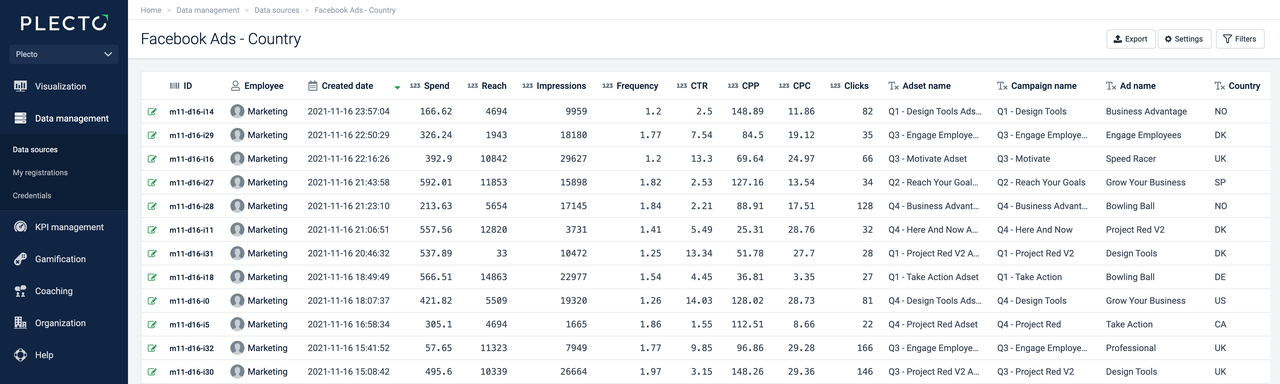
With our integration to Facebook, you can track your paid SoMe marketing metrics. This integration does not enable Plecto to import raw data. Instead, we import one registration per day per ad.
If you have segmented your ads, we will import one registration per day per ad per selected segment (for example, country). Read more about segments below.
How to integrate Facebook Ads with Plecto
-
Go to Data sources > New data source > Facebook.
-
Click Next and log in to your Facebook account.
-
Facebook will prompt you to give access to your Business Manager. Click OK.
-
Configure your data source settings. Here, you can change the title, choose the default date, select which fields to import, and more.
Note! When choosing Ads, remember to select the correct Account. One data source = one account.
-
Click Next to choose how much data to import and how long you want to keep it in the data source.
-
Click Import to finish.
Importing Facebook Ads
Plecto's integration with Facebook Ads allows you to import data within the following segments:
Breakdowns:
-
Age
-
Country
-
Device platform
-
City
-
Gender
-
Impression device
-
Publisher platform
-
Region
Action breakdowns:
-
Destination
-
Device
-
Reaction
-
Target ID
-
Type
Good to know!
-
How many registrations will Plecto import? Plecto creates one registration per day per ad per segment. With no segmentation, you will get 10 registrations per day if you have 10 ads. However, if you segment your data, Plecto will import more registrations, depending on how many endpoints a segment has.
-
Is it optional to choose Breakdowns and Action breakdowns or is it required? The Breakdowns and Action breakdowns are optional. It's a way to segment the data returned by the API. If not selected, they will still show in the data source settings as blank options, but the data source should be able to import data without them.
Ad campaign structure
There are three levels to the campaign structure on Facebook. Learn more about the ad campaign structure in Facebook's developer documentation.
-
Campaign: Campaigns contain your advertising objectives and one or more ad sets.
-
Ad set: An ad set contains one or more ads. Here you define the budget, schedule, and placement for each ad set.
-
Ad: Individual ads form part of the ad set.
Available data
Our integration with Facebook Ads currently allows you to import the following data:
Possible breakdowns: Age, Country, Device platform, City, Gender, Impressions device, Publisher Platform and Region.
Possible action breakdowns: Destination, Device, Reaction, Target ID, Type.
Update frequency: 15m
Default date field: date_start
Supports custom fields? No
Supports webhooks? No
Supports automatic registration deletion? No
Supports relations? No
This data type allows you to see your page engagement statistics – these can be impressions, views, video views, likes, posts impressions, etc.
Update frequency: 8h
Supports custom fields? No
Supports webhooks? No
Supports automatic registration deletion? No
Supports relations? No
Possible breakdowns: Gender & Age, Country, Language, City.
Update frequency: 8h
Supports custom fields? No
Supports webhooks? No
Supports automatic registration deletion? No
Supports relations? No
See how many clicks, impressions, or engaged users your Facebook posts get. List of possible metrics include: post reactions, impressions (unique, paid, organic, viral, non-viral), feedback, etc.
Update frequency: 8h
Supports custom fields? No
Supports webhooks? No
Supports automatic registration deletion? No
Supports relations? No
What KPIs can I track from Facebook?
Here's an overview of metrics you can track with our Facebook Ads integration.
Currently, our Facebook integration does not support Website Purchases Conversion Value, Pixel and Lead Forms.
| Social clicks | This metric counts the number of clicks to link your ad receives when it's shown with social information (for example, Tyler Bryant likes this). |
|---|---|
| Unique social clicks | This metric counts the unique number of people who performed a click on your Facebook page or ad. |
| Clicks | The number of clicks on your ads. This metric counts multiple types of clicks, including certain types of interactions with the ad such as link clicks, links to the associated business profile page, likes, comments or shares, clicks to expand media (photos to full screen), clicks to take action identified as your campaign objective (such as liking your page). |
| Spend | The amount spent on your campaigns. See how much you've spent compared to your maximum budget during a specific time period (current week, month, quarter, others). |
| Social reach | The number of people who saw your ad when it was displayed with social information, which shows other Facebook friends who engaged with your Facebook page or ad. |
| Reach | The number of people who saw your ads at least once. It gives you a measure of how many people got exposed to your message during an ad campaign. People may not always click on your ads, but they may be more likely to engage with your business when they see your message. |
| CTR | The percentage of times that people saw your ad and performed a click. It is calculated as all clicks divided by impressions. The click-through rate is a measure of success for an online advertising campaign. Pairing this with website conversions allows you to understand more about what actions people take after they click on the link. |
| Unique CTR (unique link CTR) | This metric measures the percentage of people who saw your ad and performed a unique click. It is calculated as follows: Unique clicks / Reach |
| Unique clicks | The number of people who performed a click. |
| Cost per unique click | The average cost for each unique click. It is calculated as follows: Total amount spent / Unique clicks |
| CPM | Cost per 1000 impressions. |
| Impressions | The number of times that your ads were on screen. |
| CPC | The average cost for each click. It is calculated as follows: Total amount spent / Clicks |
| Inline link clicks | The number of clicks on ad links. Link clicks are one way to measure the interest that your ad generates among your audience. |
| Cost per unique inline link click | The average cost for each unique click to link. It is calculated as follows: Total amount spent / Unique clicks |
| Total actions | The total number of actions people took that are attributed to your ads. Actions can include engagements, clicks, or conversions (purchases or adding to a cart on a website). |
| Cost per any action | The total number of actions people took that are attributed to your ads. |
| Cost per inline post engagement | The average cost for each post engagement (post engagements are actions such as reacting, commenting, or sharing the ad, claiming an offer, viewing a photo or video, or clicking on a link). |
| Social impressions | The number of times that your ads were viewed when displayed with social information, which shows Facebook friends who engaged with your Facebook page or ad. |
| Impression device | The device that your ad is viewed on. |