Sign in
Zendesk Support
How to integrate Zendesk Support with Plecto
-
Go to Data sources > New data source > Zendesk Support.
-
Enter your company's subdomain or full domain. You can find it in the URL when logged in to your Zendesk Support account. The domain looks something like mycompany.zendesk.com
-
Click Next to continue.
-
Select the data you want to import.
-
Configure your data source settings. Here, you can change the title, choose the default date, select which fields to import, and more.
-
Click Next to choose how much data to import and how long you want to keep it in the data source.
-
Click Import to finish.
Available data
Currently, you can import the following data from Zendesk Support to Plecto:
Update frequency: 2m
Default member field: agent_id
Default date field: created_at
Supports custom fields? No
Supports webhooks? No
Supports automatic registration deletion? No
Supports relations? No
Update frequency: 2m
Default member field: updater_id
Default date field: created_at
Supports custom fields? Yes
Supports webhooks? No
Supports automatic registration deletion? No
Supports relations? No
Update frequency: 2m
Default member field: assignee_id
Default date field: created_at
Supports custom fields? No
Supports webhooks? No
Supports automatic registration deletion? No
Supports relations? No
Update frequency: 2m
Default member field: assignee_id
Default date field: created_at
Supports custom fields? Yes
Supports webhooks? No
Supports automatic registration deletion? No
Supports relations? No
What is the difference between Tickets and Events in Zendesk Support?
Tickets
Whenever there are changes in your support tickets in Zendesk, we update the registrations in your Plecto data source. The changes can be an updated status, changed priority, changed ticket type, or others.
Events
Events log any changes that occur in your Zendesk tickets. Each event (one event = one registration in the Events data source) represents an update in a ticket and contains all the fields that were updated in that change.
So every time you change the ticket status (or anything else), it will create a new event. Learn more in Zendesk's developer docs.
Currently, Plecto handles three types of events: Status change, New ticket comment, Custom field changed (also called Actions in the Events data source). For each event, we log the new value of the event and the field that got changed.
Rate limits for Zendesk API
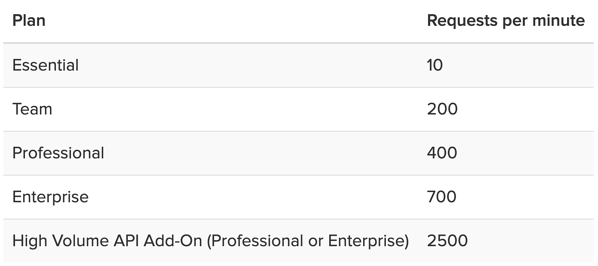
Zendesk API is rate limited, which means that only a certain number of requests per minute is allowed. The rate limit depends on your Zendesk subscription plan and the endpoint.
If you get rate limited, the automatic imports in Plecto will pause, and they will only resume once you can ask for more data from Zendesk. In case your imports are paused, you will see a yellow progress bar in your data source settings and underneath the data source listed on the Data sources page.