 Sign in
FlexyBox
How to integrate FlexyBox with Plecto
This integration is in BETA. It is subject to change based on testing and your feedback. Learn more
-
Go to Data sources > New data source > FlexyBox.
-
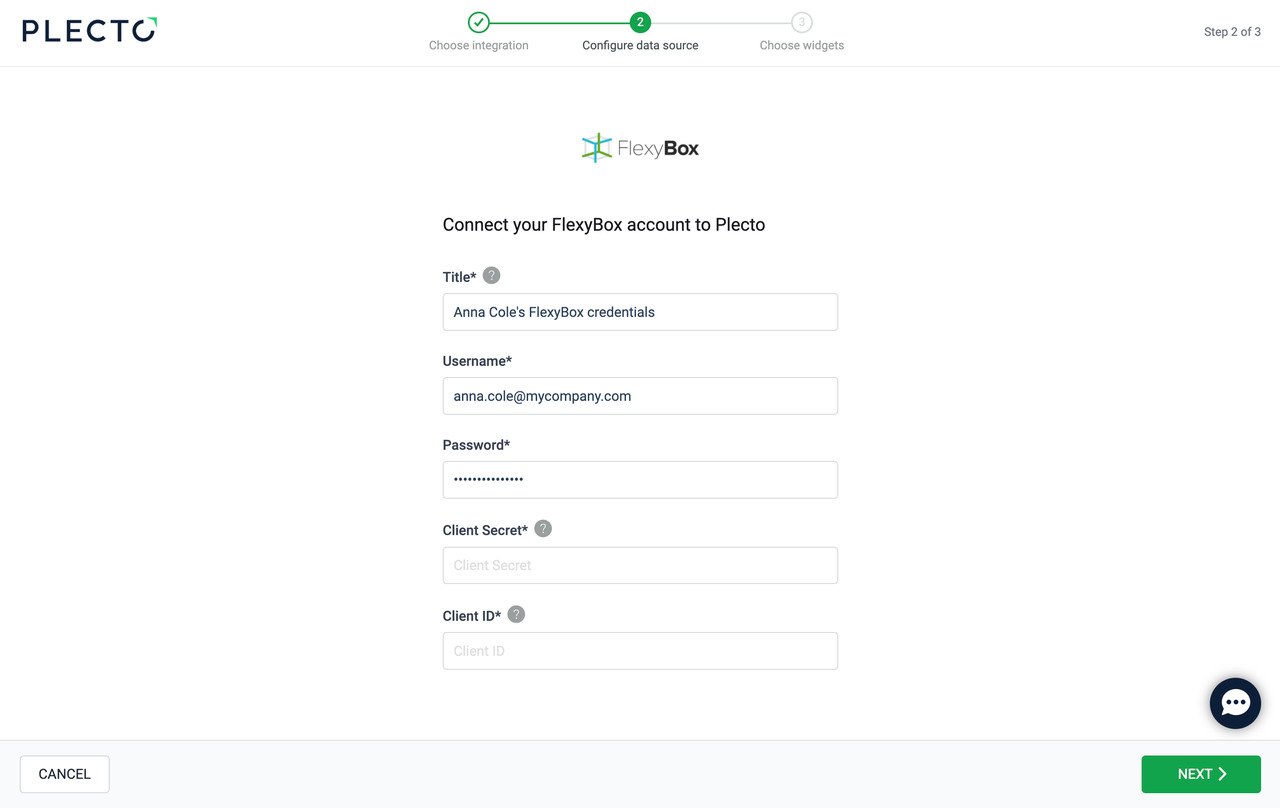
(Optional) Rename your credentials.
-
Enter your username and password – they are the same you use to log in to FlexyBox.
-
Enter your Client ID and Client Secret. Go to https://flexybox-account.azurewebsites.net/clients to find or generate your credentials.
-
Click Next.
-
Select the data you want to import.
-
Configure your data source settings. Here, you can change the title, choose the default date, select which fields to import, and more.
-
Click Next to choose how much data to import and how long you want to keep it in the data source.
-
Click Import to finish.
Available data
Our integration with FlexyBox currently allows you to import the following data:
Update frequency: 15m
Supports custom fields? No
Supports webhooks? No
Supports automatic registration deletion? No
Supports relations? No
Update frequency: 2m
Supports custom fields? No
Supports webhooks? No
Supports automatic registration deletion? No
Supports relations? No
Update frequency: 2m
Supports custom fields? No
Supports webhooks? No
Supports automatic registration deletion? No
Supports relations? No
Update frequency: 2m
Supports custom fields? No
Supports webhooks? No
Supports automatic registration deletion? No
Supports relations? No