 Sign in
ActiveCampaign
Step 1: Get an API key and subdomain from ActiveCampaign
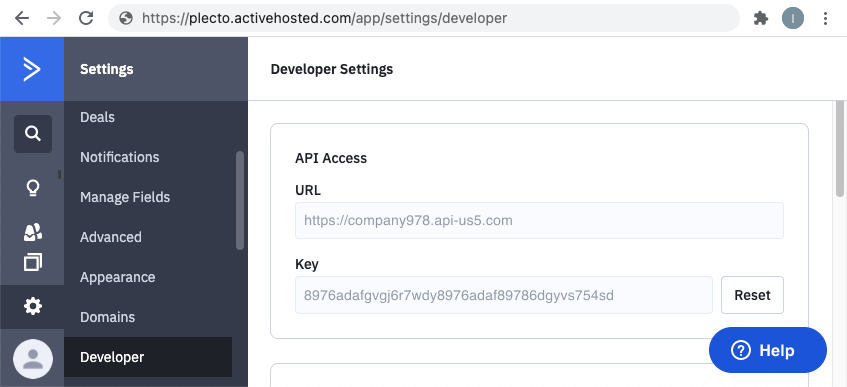
To create an ActiveCampaign data source in Plecto, you need to obtain an API key from ActiveCampaign and find your subdomain.
-
Open your ActiveCampaign account.
-
Go to Settings > Developer > Key.
-
Copy the string from the field Key. You will have to use it in Step 2.
-
Find your subdomain. You'll see the subdomain in the URL when you open your ActiveCampaign account. The subdomain in the following example is highlighted in pink:
company.activehosted.com/
Step 2: Integrate ActiveCampaign with Plecto
-
Go to Data sources > New data source > ActiveCampaign.
-
(Optional) Rename your credentials.
-
Insert the API key you copied from ActiveCampaign.
-
Enter your ActiveCampaign subdomain.
-
Click Next.
-
Select the data you want to import.
-
Configure your data source settings. Here, you can change the title, choose the default date, select which fields to import, and more.
-
Click Next to choose how much data to import and how long you want to keep it in the data source.
-
Click Import to finish.
Available data
Currently, you can import the following data from your ActiveCampaign account to Plecto:
Update frequency: 2m
Supports custom fields? No
Supports automatic registration deletion? No
Supports relations? No
Update frequency: 2m
Supports custom fields? No
Supports automatic registration deletion? No
Supports relations? Yes
Update frequency: 2m
Supports custom fields? No
Supports automatic registration deletion? No
Supports relations? No
Update frequency: 2m
Supports custom fields? No
Supports automatic registration deletion? No
Supports relations? No
Update frequency: 2m
Supports custom fields? No
Supports automatic registration deletion? No
Supports relations? Yes
Update frequency: 2m
Supports custom fields? No
Supports automatic registration deletion? No
Supports relations? Yes
Update frequency: 2m
Supports custom fields? No
Supports automatic registration deletion? No
Supports relations? No
Update frequency: 2m
Supports custom fields? No
Supports automatic registration deletion? No
Supports relations? No
Update frequency: 2m
Supports custom fields? No
Supports automatic registration deletion? No
Supports relations? No