 Sign in

Close CRM dashboard examples: leads, pipeline and calls in real time
Plecto turns Close leads, opportunities and calls into live dashboards, leaderboards and contests that your sales team sees on TVs and phones.
What is a Close CRM dashboard?
A Close CRM dashboard is a live view of the numbers your sales team is measured on, built from Close leads, opportunities, calls and emails. Close has built-in reports inside the CRM. Plecto adds a real-time Close CRM dashboard for TVs and phones, with targets, leaderboards and contests, so reps see their own results without opening a report.
Close was formerly called Close.io, so you may still see teams search for a Close.io dashboard. The three examples below are demo dashboards built with Plecto's dashboard widgets and example data, with fictional reps. They show what teams build from Close data. The rest of the page covers which KPIs to use, how Close reporting compares with a Close dashboard in Plecto and how to set one up step by step.
Close CRM dashboard example: won value, calls and win rate
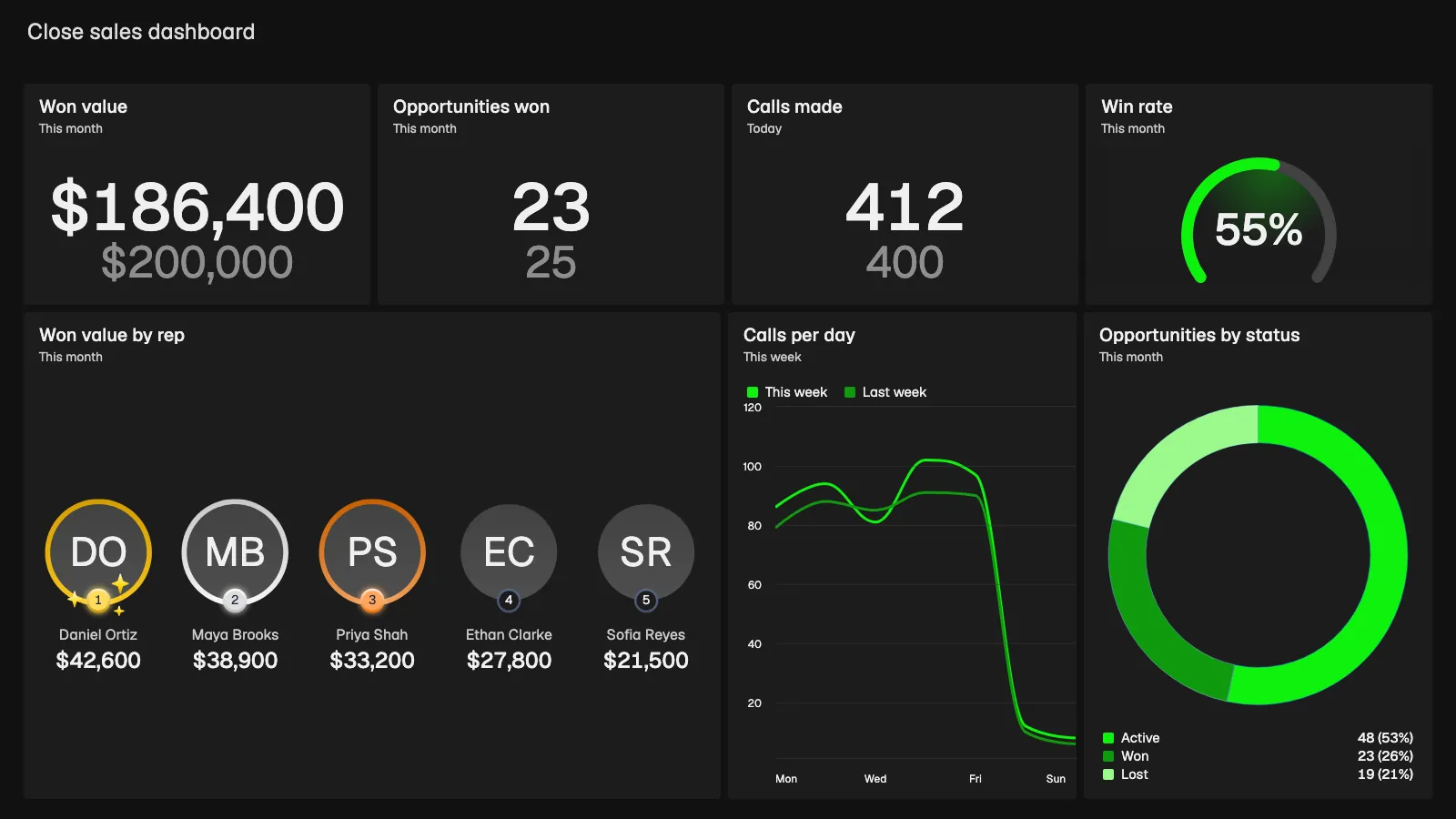
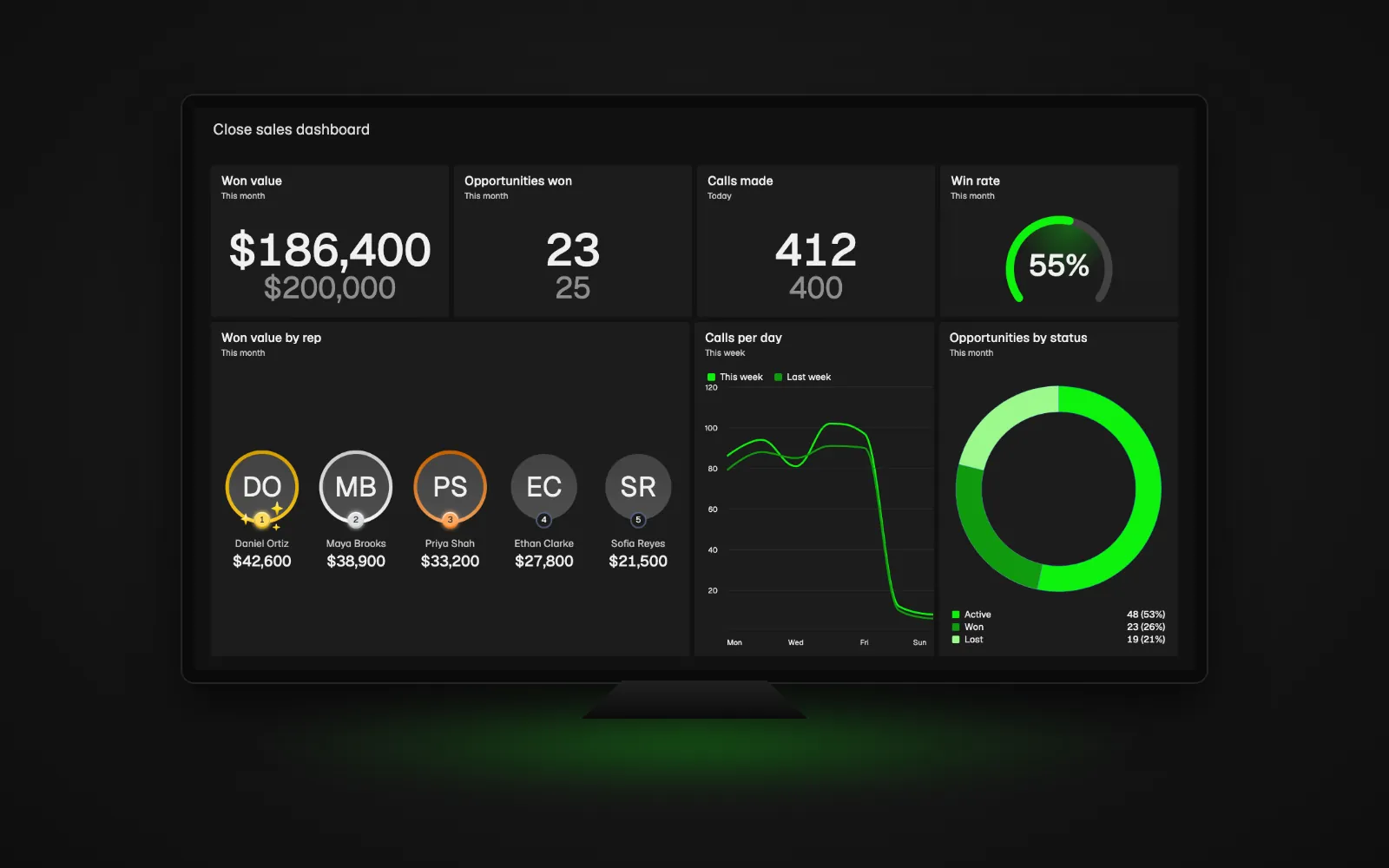
The Close sales dashboard at the top of this page puts the month's result first. It shows a won value of $186,400 against a target of $200,000, 23 opportunities won against 25 and 412 calls made today against a target of 400. A gauge shows a win rate of 55% for the month.
Below, a leaderboard ranks the top five reps by won value, from Daniel Ortiz at $42,600 to Sofia Reyes at $21,500. A line chart compares calls per day this week with last week, from Monday to Sunday, and a donut splits this month's opportunities by status: Active 48, Won 23 and Lost 19. Opportunities and calls are credited to the Close user, so every rep finds their own line. The KPIs behind this view are number of won deals, win rate of deals and number of calls.
Explore Plecto sales dashboardsClose dashboard example: lead status and pipeline value
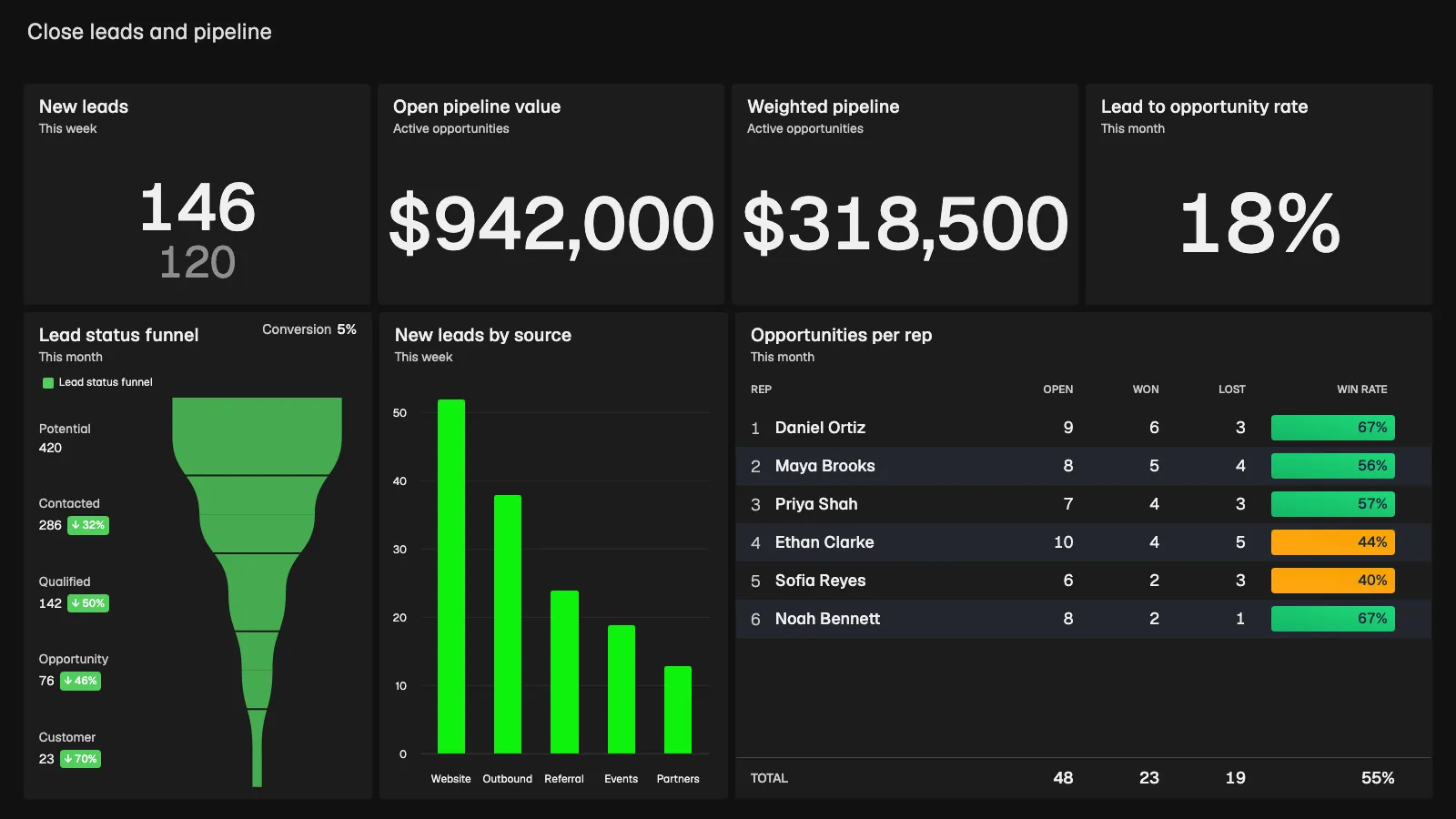
The pipeline view answers a different question: is there enough in the funnel to hit the number? This example shows 146 new leads this week against a target of 120, $942,000 in open pipeline value, a weighted pipeline of $318,500 and a lead to opportunity rate of 18%.
A funnel follows lead status from Potential (420) through Contacted (286), Qualified (142) and Opportunity (76) to Customer (23). A column chart shows new leads this week by source: Website 52, Outbound 38, Referral 24, Events 19 and Partners 13. A table lists open, won and lost opportunities and the win rate per rep, colored green, yellow or red, with a total of 48 open, 23 won, 19 lost and a 55% win rate. See weighted pipeline value and number of new leads for the formulas.
Close CRM reporting example: calls and activity per rep
Close is built for high-activity outreach, so activity numbers are the early signal behind the deals. This example shows 412 calls made today against a target of 400, 38h 24m of talk time, 1,286 emails sent and 35 meetings booked against a target of 30.
A table lists every rep today with calls, talk time, emails, SMS, meetings, tasks done and connect rate. Connect rates of 33% or higher are green, 25% to 32% yellow and anything below 25% red, so Maya Brooks (64 calls, 38%) stands out from Noah Bennett (37 calls, 22%). The total row shows 412 calls and a 32% connect rate. Related KPIs are number of emails sent, number of booked meetings and number of meetings completed.
See the sales activities dashboard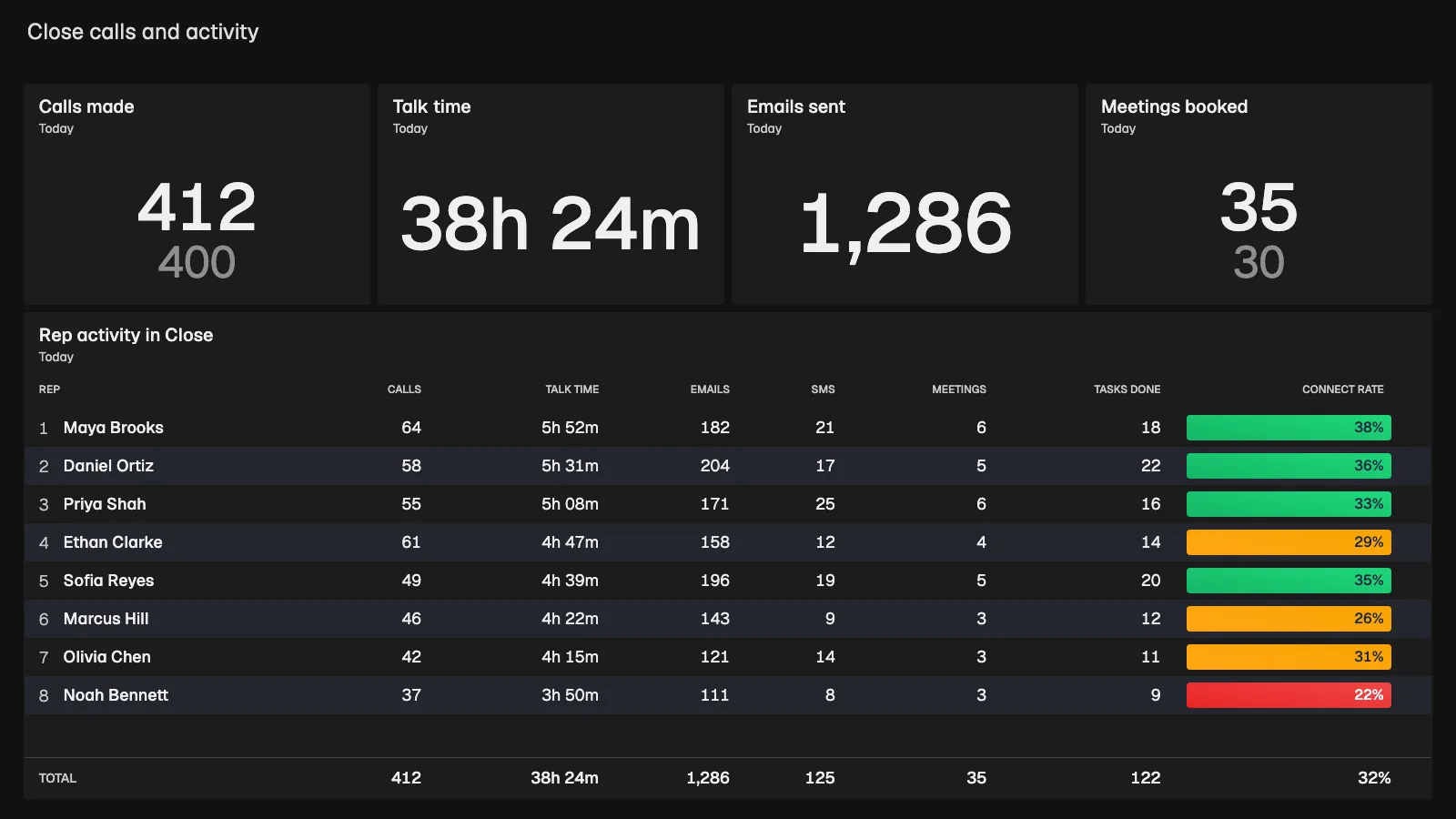
Which KPIs belong on a Close CRM dashboard?
Start with five to eight numbers per team, pairing results with the KPIs that drive them.
Sales outcome KPIs
Track number of won deals, win rate of deals, average deal size and number of lost deals. In Close, these come from opportunities.
Pipeline KPIs
Follow weighted pipeline value, average sales cycle length and number of new leads. Leads, opportunities and lead status changes are all importable Close data types.
Activity KPIs
Put number of calls, number of emails sent and number of booked meetings next to the result KPIs so reps see what drives them.
Close's calls, emails, meetings, tasks and opportunities are the base for most of these KPIs, and you can write your own formulas with custom KPIs when your sales process is different.
Close dashboard design: build one your reps will read
A Close dashboard only changes behavior if the team looks at it. These habits help, whichever tool you build it in:
- Keep it to a handful of numbers. Put the result KPI, such as won value, next to the activity KPIs that drive it, such as calls and booked meetings.
- Show every rep against a target. A number next to a target, with conditional colors for on track, close and behind, tells a rep what to do next.
- Check ownership first. Make sure calls and opportunities are assigned to the right Close user before you rank anyone.
- Celebrate in the moment. A notification can announce a won opportunity on the slideshow.
- Rank, then reward. A sales leaderboard is the simplest start, and the article on gamification practices for Close CRM shows how to take it further.
Close CRM reporting vs a real-time Close dashboard in Plecto
Close's built-in reports are the right choice when the people who need the numbers already work in the CRM. They sit next to your leads and opportunities, so analysis is one click away. Check Close's help pages for what your plan includes.
Plecto fits when you want the numbers on the floor and attached to people. Close data reaches Plecto every 2 minutes.
| If you want | Use |
|---|---|
| Analysis and reports for people who work in Close all day | Close's built-in reports |
| A live screen for the sales floor, on an office TV or a phone | A Plecto Close CRM dashboard |
| Every rep against a target, with green, yellow and red status | A Plecto Close CRM dashboard |
| Leaderboards, notifications and contests on Close data | Plecto (contests on the Large and Enterprise plans) |
| Close next to phone, helpdesk or other data on one screen | Plecto, with 150+ integrations |
Plecto is not a replacement for ad hoc analysis in the CRM. Many teams keep Close as the system of record and use Plecto as the live layer on top. Read more about reports in Plecto and the Close integration.
Show your Close dashboard on an office TV
Close teams make a lot of calls, so a wall screen keeps the day's numbers in view. Put the sales overview on an office TV and every rep sees won value, calls made and the leaderboard without asking. Plecto runs on any TV through tv.plecto.com, and the TV dashboards guide covers TV apps and browsers.
Close data also powers competition. Turn won value, opportunities won or calls made into a sales contest with a target and an end date, or rank reps on a live sales leaderboard. Contests are available on the Large and Enterprise plans. See gamification in Plecto for the full set of tools.
How to build a Close CRM dashboard in Plecto
- Create a Close API key. In Close, go to Settings > Integrations > API Keys > New API Key and copy the key.
- Connect Close. In Plecto, go to Data sources > New data source > Close and paste the key.
- Choose the data types. Pick what your team is measured on: Calls, Contacts, Custom Activities, Emails, Lead Status Change, Leads, Meetings, Opportunities or Tasks. Configure the fields and choose the import range, then click Import.
- Create the KPIs. Go to Formulas > New formula and write, for example, won value this month or calls made today.
- Add widgets. In Dashboards, add KPIs, leaderboards and charts, and set targets and conditional colors.
- Show it on a TV. Add the dashboard to a slideshow under Slideshows and activate it on a TV.
Close Custom Activities have no initial historical import, so only new updates arrive. Run a manual import if you need history. The Close integration guide lists every data type, and Plecto offers a 14-day free trial with no credit card required.
Close CRM dashboard FAQ
It depends on who needs the numbers. Close's built-in reports suit analysis inside the CRM, and BI tools suit company-wide modeling. Plecto suits live per-rep performance on TVs and phones, with targets, leaderboards and contests on Close data. Read about the Close integration to see what Plecto imports.
Yes. In Plecto, add your Close dashboard to a slideshow, open tv.plecto.com on any TV and enter the four-digit code it shows under Slideshows. TVs are free on all plans, and you can rotate the Close dashboard with leaderboards and other KPI dashboards. Read the TV dashboards guide.
Plecto checks Close for new data every 2 minutes. Close data is not sent through webhooks, so a new call or won opportunity appears on the dashboard at the next check. Custom Activities only import new updates from the moment you connect. The Close integration guide has the details.
Start with results and the activity behind them: won value, opportunities won, win rate, new leads, weighted pipeline value, calls made and meetings booked. Show each rep against a target. The article on the 8 best KPIs for Close CRM explains the most common ones.
Yes, on the Large and Enterprise plans. Turn won value, opportunities won or calls made into an individual or team contest with a target and an end date, and show it on a TV. Read more about contests and gamification in Plecto.
Yes. Close was formerly called Close.io, and Plecto connects to it with a Close API key. The integration imports calls, contacts, leads, opportunities, emails, meetings, tasks, custom activities and lead status changes. See the Close integration page.
Yes. Plecto has 150+ integrations and unlimited data sources on every plan, so you can show Close opportunities next to calls from your phone system or tickets from your helpdesk. Each source refreshes at its own rate. See the CRM dashboard examples for more ideas.