 Sign in

Digital sales board
A digital sales board for your office TVs and phones
Replace the whiteboard on the wall with a digital sales board that updates itself from your CRM and phone system. Show revenue against target, rep rankings and every closed deal on office TVs, and on phones for reps who work remotely or in the field.
What is a digital sales board?
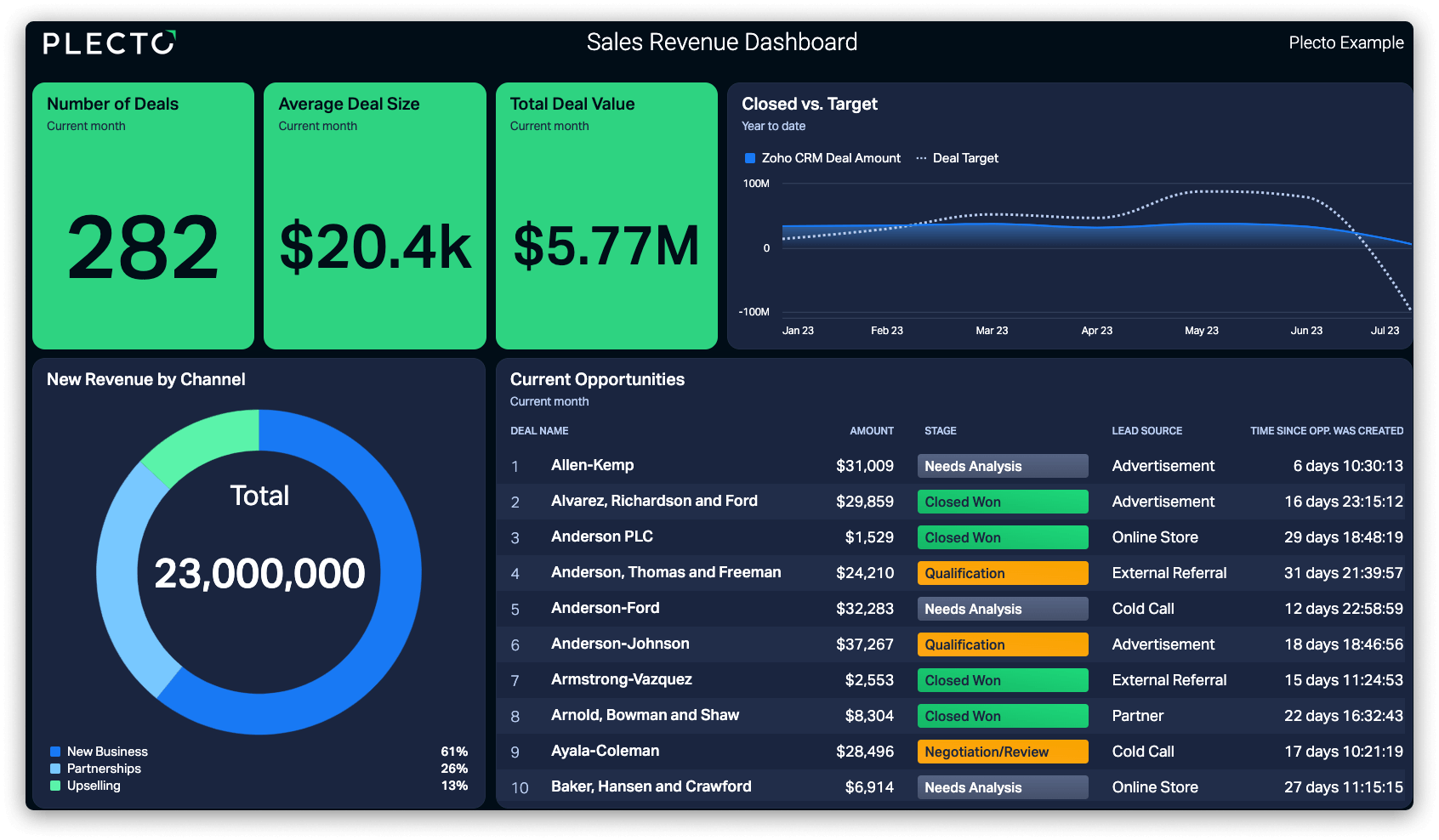
A digital sales board is a live display of your sales numbers, usually shown on an office TV, that updates automatically from your CRM and other sales systems. It replaces the manual whiteboard with real-time revenue, targets, rep rankings, activity counts and closed deals that the whole team can see at a glance.
The idea is the same as the whiteboard in a sales office: put the numbers where everyone can see them, so the team knows how the day, week or month is going. The difference is that nobody has to walk over and write them up. The digital sales board reads the data from the systems where deals and calls are already logged, so it is current, consistent and the same for everyone.
Plecto is sales dashboard software that turns CRM, phone and spreadsheet data into a digital sales board you can run on unlimited office TVs, in the browser and in the iOS and Android mobile app.
What to put on a digital sales board
A board that tries to show everything shows nothing. Start with the numbers your team can influence today, and add to them only when someone asks.
- Revenue against target. Closed revenue today, this week and this month compared with the goal, so everyone sees the gap to close.
- Rep and team leaderboard. A ranking on one KPI, such as revenue, won deals or booked meetings. Our guide to the sales leaderboard covers how to build one that motivates.
- Deals closed today. A running count and a list of the latest wins, with the rep's name and the deal size if your culture is comfortable with that.
- Activity counts. Calls made, conversations, meetings booked and demos held. Activity is the number reps can change within the hour.
- Pipeline. Open pipeline value, deals by stage and new opportunities this week, so the team sees whether next month is covered.
- Celebrations. A notification on the screen when a deal closes, which is what makes people look up at the board in the first place.
Digital sales board vs whiteboard
What changes when the numbers update themselves.
| Whiteboard | Digital sales board | |
|---|---|---|
| Updating | Someone writes numbers by hand, usually at the end of the day | Pulls from your CRM and phone system automatically |
| Accuracy | Depends on who remembered to update it | One calculation from the source data for everyone |
| Freshness | As old as the last marker stroke | Integration data refreshes about every two minutes in Plecto |
| Targets and status | A number on the board | Targets with red, yellow and green colors |
| Remote and field reps | Cannot see it | Available on phones and in the browser |
| Multiple offices | One board per room | The same board on every TV |
| Wins | A tick mark | A notification the moment a deal is closed |
| Effort | A daily chore for a manager | Set up once, then it runs on its own |
How a digital sales board works in Plecto
Plecto separates three jobs: getting the data in, turning it into a board, and putting the board on screens.
- Connect your sales data. Plecto has native integrations for 150+ systems, including CRMs such as Salesforce, HubSpot and Pipedrive and phone systems such as Aircall, Dialpad and RingCentral. Spreadsheets, SQL databases, the API and manual registrations cover the rest.
- Build the board. Turn the data into KPIs, such as revenue, won deals and meetings booked, and put them on a dashboard with targets and conditional colors. Add a leaderboard widget for the ranking.
- Show it on the TV. Add the dashboard to a slideshow, a set of slides that rotate automatically. A slide can be a dashboard, a contest, a YouTube video or any web page. Then activate the slideshow on a TV with the Plecto TV app for LG, Samsung and Android TV, or by opening tv.plecto.com in the TV's browser. There is no extra cost per TV.
- Add the celebrations. Create a notification that fires when a deal is won or a target is reached. Notifications can show a banner or play a video on the slideshow, and Plecto's documentation also lists sound and lighting actions through Sonos and Philips Hue.
- Put it on phones. Reps working from home or in the field open the same dashboards in the Plecto app.
If you are still deciding which tool to use, our TV dashboard software guide compares eight tools side by side. For hardware, see which TV or device works best.

Why teams use a digital sales board
Everyone sees where the team stands. Reps do not have to ask a manager how the month is going, and managers do not have to compile the answer. The digital sales board shows it all day.
It makes the gap visible while there is time to close it. A revenue target with a color on it shows on Wednesday that the week is behind, not on Monday when the report arrives.
It gives wins an audience. A deal closing is a good moment, and a notification on the TV turns it into a shared one. Reps start glancing up at the screen when a colleague makes a deal, which is the habit a board should build.
It saves a manager's time. No daily numbers round-up, no end-of-day whiteboard update, and no argument about which spreadsheet is right.
Digital sales board examples by team
The right board depends on who looks at it and what they can change.
Sales floor board
Revenue against the monthly target, a team leaderboard and the latest closed deals on one large TV, next to a slide with open pipeline by stage.
Inside sales and telemarketing board
Calls, conversations and meetings booked per rep, refreshed through the day. Activity is the headline here, so the leaderboard ranks effort as well as outcomes.
Field sales board
Reps on the road check their own numbers and the team ranking in the mobile app between visits, and see closed deals appear without calling the office.
Retail store board
Sales against target by hour or by store, shown in the back office or staff room so teams know where they stand before the day ends.
Multi-office board
The same dashboards on screens in every office, with team rankings that make cross-office competition possible without anyone updating a spreadsheet.
Sales activities board
Calls, emails and meetings per rep and per day, for managers who coach on activity before results show up in revenue.
Digital sales board design tips
A digital sales board is read from several meters away, for a few seconds at a time. Design it for that moment.
- Show three to five KPIs per screen. Plecto's dashboard best practices recommend three to five per person. More than that and nobody reads the board.
- Make the numbers big. If a rep cannot read a number from their desk, it should not be on the TV.
- Rotate screens. Put the leaderboard, the revenue target and the pipeline on separate slides and let the slideshow cycle between them. Each slide can have its own duration and time window.
- Mix team and individual numbers. A team total gives everyone a shared goal. A ranking gives individuals something to beat.
- Rank on effort as well as results. A leaderboard that only shows revenue is always led by the same two people. Add activity or improvement-based rankings so newer reps can win something too.
- Avoid public shaming. Celebrate the top of the board and spotlight progress. Think twice before showing a "bottom five" list on a wall everyone walks past.
- Revisit it. Targets and priorities change. Check each quarter whether the board still shows what the team is working toward.
Digital dashboards and status boards: the same idea
People search for the same thing under different names, and the differences are mostly about emphasis.
- A digital dashboard is the general term: any live screen of KPIs from your systems, for any team. A digital sales board is a digital dashboard built for a sales team and designed for a wall.
- A status board shows the current state of something at a glance, such as open tickets, calls waiting or whether a target is on track. A sales status board is a digital sales board that puts status first: green, yellow and red against target.
- A live dashboard emphasizes freshness. In Plecto, the data from most integrations refreshes about every two minutes.
All three are built the same way: connect data, define KPIs, set targets and show the result on a screen. For the wider picture, see our page on KPI dashboard software.
How to set up a digital sales board in Plecto
- Choose the goal of the board. Decide whether it is there to track revenue, drive activity or celebrate wins, and pick three to five KPIs to match.
- Connect your CRM and phone system. In Data sources, add your system from the integrations library, or upload a spreadsheet if you are just testing.
- Create the KPIs and a leaderboard. Use formula templates or the visual formula editor to calculate revenue, won deals and activities per rep. Browse the KPI library for definitions.
- Build the dashboard. Add the KPIs as widgets, set targets and conditional colors, and rank your reps with a leaderboard.
- Create a slideshow and activate it on a TV. Add the dashboard to a slideshow, open the Plecto app or tv.plecto.com on the TV, and activate it with the four-digit code or QR code.
- Add a notification for closed deals. Choose the trigger, the slideshow and the celebration, and test it with a real deal.
For a CRM-specific walkthrough, see how to create a TV dashboard with Salesforce or HubSpot.
Digital sales board FAQ
A digital sales board is a live screen that shows a sales team's numbers, such as revenue against target, rep rankings, calls and closed deals. It pulls data automatically from your CRM and other systems, so it replaces the whiteboard and the manual spreadsheet update with numbers that are always current.
Start with revenue against target, a leaderboard by rep or team, deals closed today and a few activity counts such as calls and meetings booked. Add pipeline value if the team can influence it this month. Keep it to three to five KPIs per screen, and rotate other views through a slideshow.
In Plecto, add your sales dashboard to a slideshow, then open the Plecto TV app on an LG, Samsung or Android TV, or open tv.plecto.com in the TV's browser. Enter the four-digit code or scan the QR code, choose the slideshow and activate the TV. There is no extra cost for TVs.
Yes. Plecto connects natively to CRMs including Salesforce, HubSpot and Pipedrive, and to 150+ systems in total. You can also add data from spreadsheets, SQL databases, the API or manual registrations. Once connected, the board updates itself and integration data refreshes about every two minutes.
For most teams, yes. A whiteboard depends on someone updating it and only helps people in the room. A digital sales board updates automatically, shows targets and status colors, and works on phones for remote and field reps. A whiteboard can still add a personal touch, so some teams keep both.
Yes. The same dashboards are available in the browser and in the Plecto iOS and Android app, so remote and field reps see their numbers and the team ranking without being in the office. Notifications about closed deals can also reach the team beyond the TV.
Build your first digital sales board today.
14-day free trial. No credit card required.