 Sign in

Zendesk Explore Live Dashboards Are Being Removed: What Support Teams Should Do
Zendesk Explore live dashboards stop working on 25 January 2027. See what changes and how to keep your live Zendesk wallboard running with Plecto.
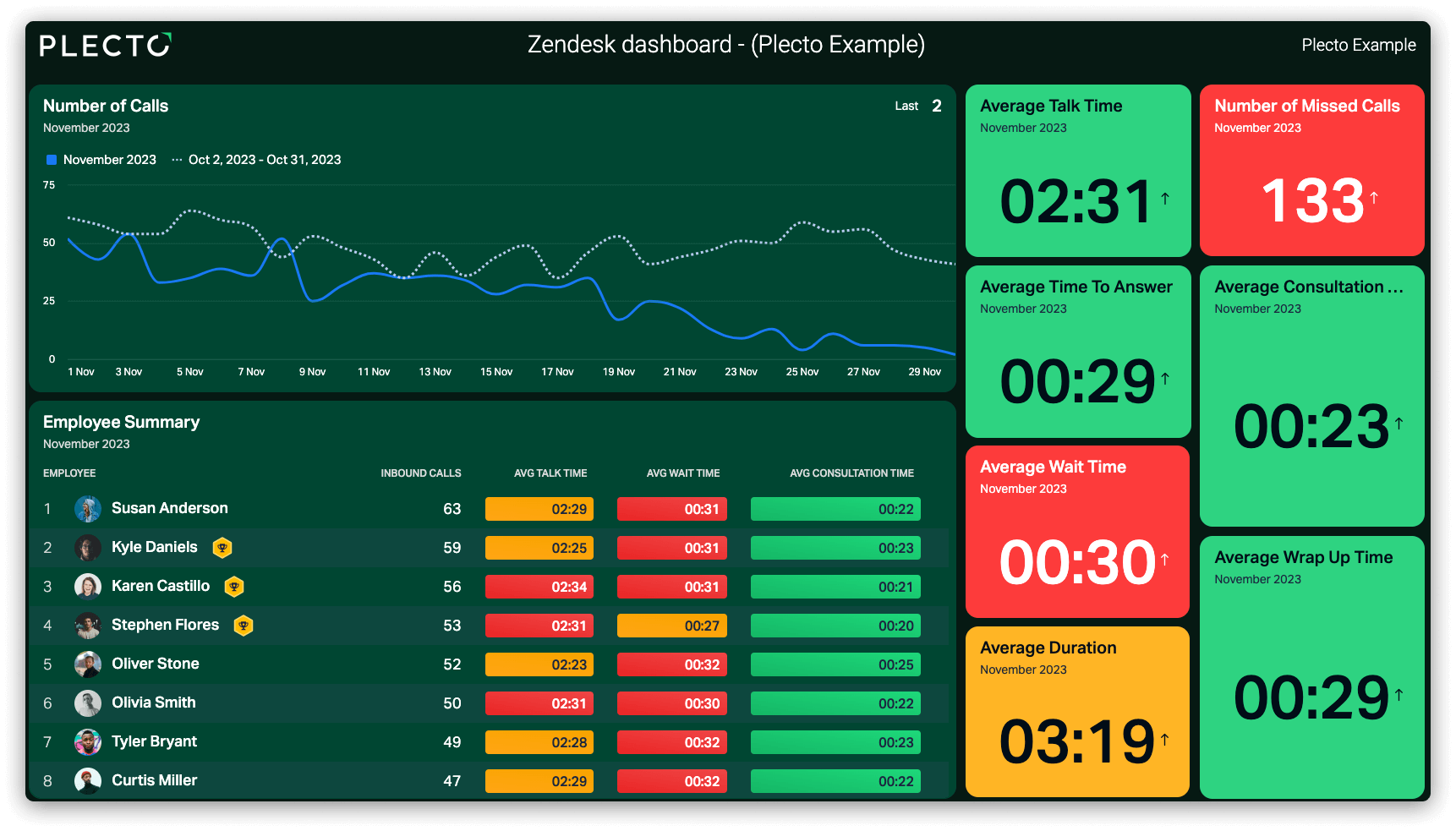
If your support floor watches a screen powered by Zendesk Explore live dashboards, the clock is running. Zendesk is removing Explore live reporting on 25 January 2027, and from that day live components stop showing data. You do not have to wait for Zendesk's replacement to keep that screen live. Plecto works with Zendesk Support today: it puts your ticket, CSAT and call KPIs on any office TV and adds the targets, leaderboards and notifications that turn a wallboard into something your agents act on. This guide covers what changes, your options and how to move your live view to Plecto in five steps.
Short answer: On 25 January 2027, Zendesk removes Explore live reporting. Prebuilt live dashboards disappear, you can no longer create custom dashboards with live data components, and live components in existing dashboards stop showing data. Zendesk points customers to its real-time monitoring, but rebuilding custom dashboards there has to wait until its agentic analytics is generally available. If a TV on your support floor runs on a live Explore dashboard, rebuild it in Plecto now and run both side by side until the deadline.
When Zendesk Explore live dashboards are removed
Zendesk published the announcement on 2 July 2026. You can read the original text in Zendesk's announcement of the removal of live reporting in Zendesk Explore.
| Date | What happens |
|---|---|
| 2 July 2026 | Zendesk announces the removal of Explore live reporting |
| Until agentic analytics is generally available (expected later in 2026) | Zendesk says no action is required |
| 25 January 2027 | Explore live reporting features are removed |
Zendesk expects agentic analytics to become generally available later in 2026. After that, you can migrate your live monitoring workflows and rebuild custom dashboards in the new interface. Zendesk says it will tell customers in advance when it is time to move their dashboards, and provide resources on how to do it. Because the removal date is fixed, it makes sense to plan before that notice arrives, especially if a TV on the support floor depends on a live dashboard. With Plecto, you can start now and have the new wallboard tested long before the deadline.
What stops working in Zendesk Explore live dashboards
Three things change on 25 January 2027, according to Zendesk:
- Prebuilt live dashboards are deactivated and removed from the Explore dashboard library.
- New custom dashboards with live data components can no longer be created.
- Live data components in existing custom dashboards stop displaying data.
If your team only uses Explore for historical reporting, such as last quarter's ticket volume, this announcement is about live reporting only, so check which of your dashboards actually use live components. If a dashboard on a wall screen uses them, that screen will stop showing live data on the removal date unless you move it.
Your options for Zendesk Explore live dashboards
Zendesk is not dropping live data altogether: it is moving its live monitoring features into a new real-time monitoring experience. That leaves you two routes. For a screen on the wall, we recommend the first.
Option 1: Move your Zendesk Explore live dashboards to Plecto
Plecto is built for the screen on the wall, not only the screen on the manager's desk. It connects to Zendesk Support through a native integration and imports tickets, satisfaction ratings, events and calls every 2 minutes. Zendesk streaming metrics, such as live agent status, refresh every 10 seconds. It works today, so there is nothing to wait for on Zendesk's side.
With Plecto, your Zendesk wallboard becomes something your team acts on:
- Every agent sees their own numbers. Tickets and ratings are matched to the assigned agent, so each person can follow their solved tickets and CSAT against a target.
- Friendly competition. Leaderboards rank agents on any KPI, and on the Large and Enterprise plans, contests and the Reward Store add prizes.
- The whole picture on one screen. Combine Zendesk with your phone system, CRM or any of Plecto's 150+ integrations.
- Wins people notice. Notifications can appear on the TV when something happens, for example a closed ticket.
- Any screen. Office TVs through a slideshow, the desktop and the mobile app.
Support teams use this to react faster. REMA 1000's customer care team handles eight channels and uses Plecto dashboards to see where tasks pile up, so agents can move to the busiest channel.
“Our response time has improved a lot since using Plecto. We went from around 5 or 6 minutes to at times half a minute, and approximately 3 minutes now.”
Read the full REMA 1000 story.
Keep Explore for deep, ad hoc analysis, and let Plecto be the live layer your team sees all day. Pricing is simple: you pay per tracked license, with a minimum of 10 licenses, and unlimited dashboards, data sources and TV screens are included. The Medium plan starts at $24 per license per month, billed yearly. For a side-by-side look at other tools, see our guides to customer service dashboard software and call center dashboard software.
Option 2: Wait for Zendesk real-time monitoring
Zendesk's replacement is real-time monitoring, which it says is powered by agentic analytics. Zendesk says it offers the same features as legacy live reporting, plus improved reliability, modern visualizations, enhanced alerts and customization. It is already available for Professional and Enterprise customers, according to Zendesk.
This can suit managers who work inside Zendesk all day and only need ticket data. Keep in mind that you can only rebuild your custom dashboards in the new interface once agentic analytics becomes generally available, which leaves less time to test before 25 January 2027.
How to move Zendesk Explore live dashboards to Plecto in 5 steps
Start now so you can test well before 25 January 2027.
- Inventory your live dashboards. List every Explore dashboard that uses live components, including the prebuilt ones. Note who looks at each one and where it is displayed.
- List the KPIs on each dashboard. Write down the metrics, filters and thresholds, so nothing is lost in the rebuild.
- Decide the audience. Agents on a TV need a handful of numbers they can act on today. Managers may need filters and more detail. These are often two different dashboards.
- Rebuild in Plecto. Connect Zendesk Support, create the KPIs as formulas, add them to widgets and activate a slideshow on your TV. You can also build dashboards by describing them to an AI assistant through Plecto's MCP integration.
- Test before the deadline. Run the new view next to the old one for a few weeks. Check that the numbers match what your team expects, then switch the TV over.
If you decide to stay in Zendesk, the same checklist applies once the new interface is available.
Which KPIs to keep from your Zendesk Explore live dashboards
A wallboard works when it is short. Plecto's Zendesk integration imports four data types (Tickets, Satisfaction Ratings, Events and Calls), so these are the Zendesk live KPIs that are practical to keep on screen:
- Tickets created today and open tickets. From the Tickets data. Show the backlog trend, not only the count.
- Tickets solved today, per agent. Tickets carry an assignee, so each agent sees their own number and a leaderboard becomes possible.
- CSAT. From Satisfaction Ratings, matched to the assigned agent.
- Average wait time and missed calls. From Zendesk Calls, for teams that take phone calls through Zendesk.
- Live agent status. A table widget can show who is available, using the Live Employee Status dimension.
- First response time and handle time. Plecto's 10 KPIs for customer service guide has formulas you can copy.
See the Zendesk dashboard examples for ticket, agent and CSAT views, and our customer service dashboard page for how these KPIs fit together. If you are new to wall screens, read the TV dashboards guide.
Keep Zendesk live dashboards on a TV with Plecto
Do not wait for the removal date. Connect Zendesk to Plecto, build your first wallboard and compare it with your current Explore view while it still works. Start a free 14-day trial to try it with your own Zendesk data, or book a demo to see a live Zendesk wallboard in action.
Questions
FAQs about Zendesk Explore live dashboards
Zendesk is removing Explore live reporting on 25 January 2027. Prebuilt live dashboards are deactivated, new custom dashboards cannot use live data components and live components in existing dashboards stop displaying data.
If the dashboard runs on an office TV, Plecto is built for that job. It connects natively to Zendesk Support, works today and shows per-agent numbers, leaderboards and notifications on any screen. It can also combine Zendesk with phone and CRM data. Zendesk's own replacement, real-time monitoring, suits managers who work inside Zendesk.
Zendesk says no action is required until agentic analytics becomes generally available, which it expects later in 2026, and that it will tell customers in advance when it is time to move their dashboards. Because the removal date is fixed, it is wise to inventory your live dashboards and decide where to rebuild them well before that date.
Zendesk offers real-time monitoring, powered by agentic analytics. Zendesk says it has the same features as legacy live reporting, plus improved reliability, modern visualizations, enhanced alerts and customization, and that it is already available for Professional and Enterprise customers. Check Zendesk's announcement for the latest details.
Yes. Plecto imports Zendesk tickets, satisfaction ratings, events and calls every 2 minutes, and streaming metrics such as live agent status refresh every 10 seconds. You add the KPIs to a dashboard, put it in a slideshow and activate it on any office TV. See the Zendesk Support integration for details.
No. Explore stays the place for deep, ad hoc analysis inside Zendesk. Plecto adds a live team screen on top, with targets, leaderboards, notifications and, on the Large and Enterprise plans, contests, and it can combine Zendesk with phone and CRM data.
Start your 14-day free Plecto trial today.
Enjoyed the article? Share it:


