 Sign in
How Do I Redeem a Podio Premium Voucher in Plecto?
Plecto + Podio Premium
If you have Podio Premium, you can get a voucher to use Plecto for 3 months with 50% discount! Create real-time dashboards and start boosting your performance right away!
The offer is only available to organizations on paid plans. It's not available on a trial plan.
How to redeem your voucher
-
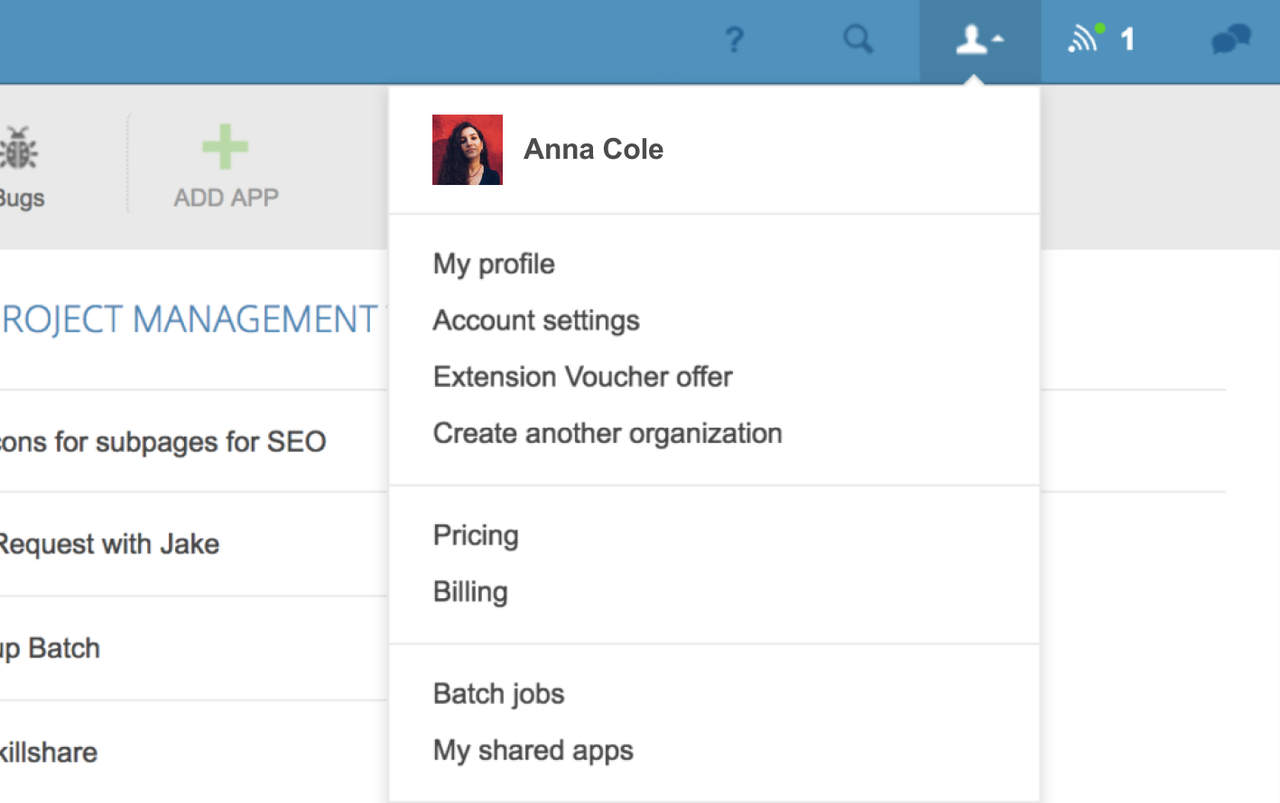
Open Podio and click on your profile in the top-right.
-
Select Extension Voucher offer.
-
You should now see the option to redeem your voucher. Click Redeem voucher, and you will proceed to create a new organization in Plecto.
If you don't have Podio Premium, you will see the option to upgrade after you open the Extension Voucher offer page.
Already using Plecto?
If you've already signed up for a trial in Plecto and have Global Admin permission, you can use your credentials to redeem the Podio voucher.
Here's what to do:
-
Integrate your Podio account to Plecto (here's a help guide)
-
Book a demo with an Account Executive
-
Redeem your voucher