 Sign in
Define Your Custom Workdays
What are custom workdays?
Does your work week start on Sunday and end on Thursday? Do you work on Mondays but not on Tuesdays?
If so, you can do the following:
-
Customize the time period on a widget to start your week on a different day than Monday,
-
Create a formula in the Advanced formula editor that allows you to define custom workdays (for example, only Mondays, Wednesdays and Thursdays).
Why is this important? Custom workday parameters allow you to get better metrics. A 5-day work week will show different monthly average than a 7-day work week.
Your week starts on another day than Monday
What to do if your work week starts on a different day than Monday?
-
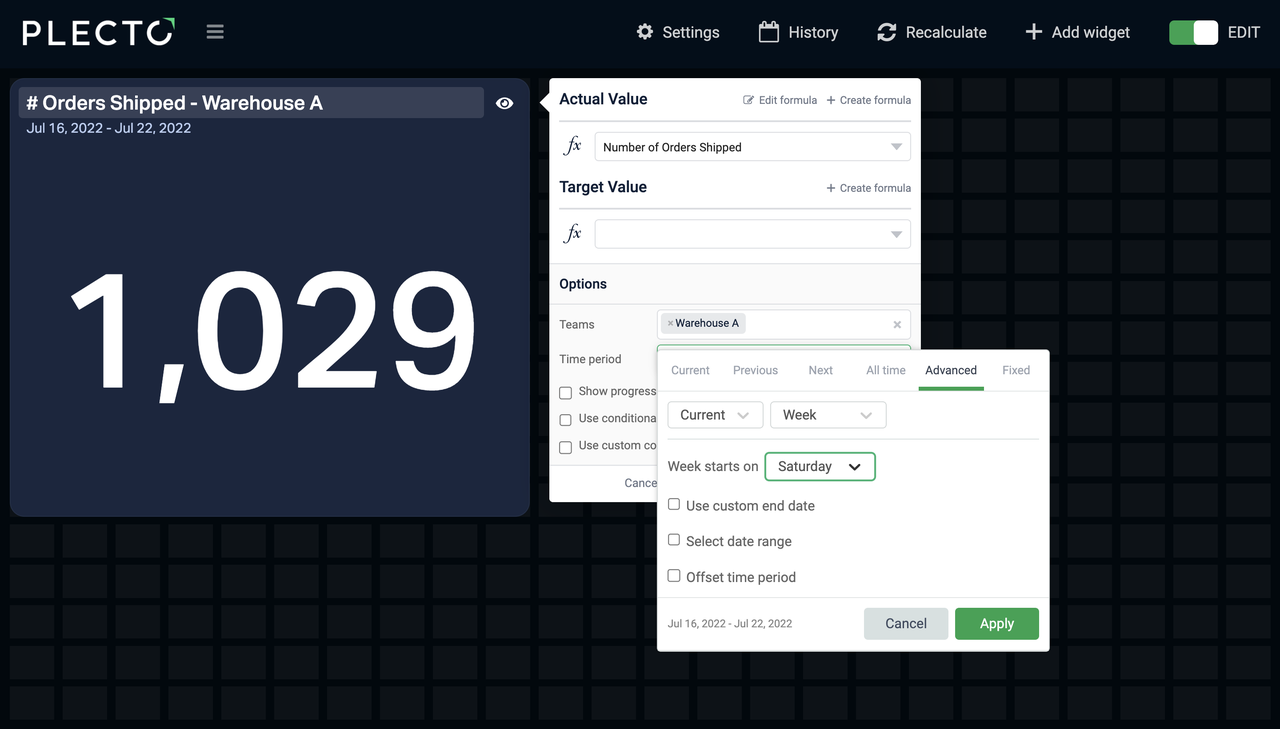
Open your dashboard and click Edit on a widget.
-
Go to the Advanced tab and choose your custom work week.
The widget will, for example, display data from Saturday to Friday instead of Monday to Sunday. It will still count all 7 days.
You work on specific days
In the Advanced formula editor, type in an optional parameter that defines which days of the week should be considered working days, and which – free.
This parameter requires a combination of 7 digits – one digit per weekday. The typing order in the formula goes from Monday to Sunday.
-
0 represents a workday
-
1 represents a day free from work
Take a look at the syntax below. The typing order in the formula goes from Monday to Sunday (left to right).
If the time period on your widget is the Current week, the formula will display 4 (because you've told Plecto that your workdays are Monday, Tuesday, Thursday, and Friday – a total of 4 days).
| (NetWorkDays(StartDate(),EndDate(),0010011)) |
|---|
Examples
| (Holidays("DK",StartDate(),EndDate(),0001011)) | In this example, the formula will count the number of holidays, but only if the holidays fall in on a Monday, Tuesday, Wednesday, or Friday. |
|---|---|
| (NetWorkDays(StartDate(),EndDate(),1000001)) | You work every day except Monday and Sunday. If time period is current week, formula result = 5. |
| (NetWorkDays(StartDate(),EndDate(),1101111)) | You work only on Wednesdays. If time period is current week, formula result = 1. |
| (NetWorkDays(StartDate(),EndDate(),0000000)) | Do you want to count all days of the week as workdays? If time period is current week, formula result = 7. |
If your work is based on custom NetWorkDays and the workweek starts on another day than Monday, make sure to adjust both your formula and the time period on the widget.