Sign in
How to Complete a Quiz
How to complete a Plecto quiz
If you’ve received a quiz invitation, here’s a simple guide to help you complete it smoothly:
-
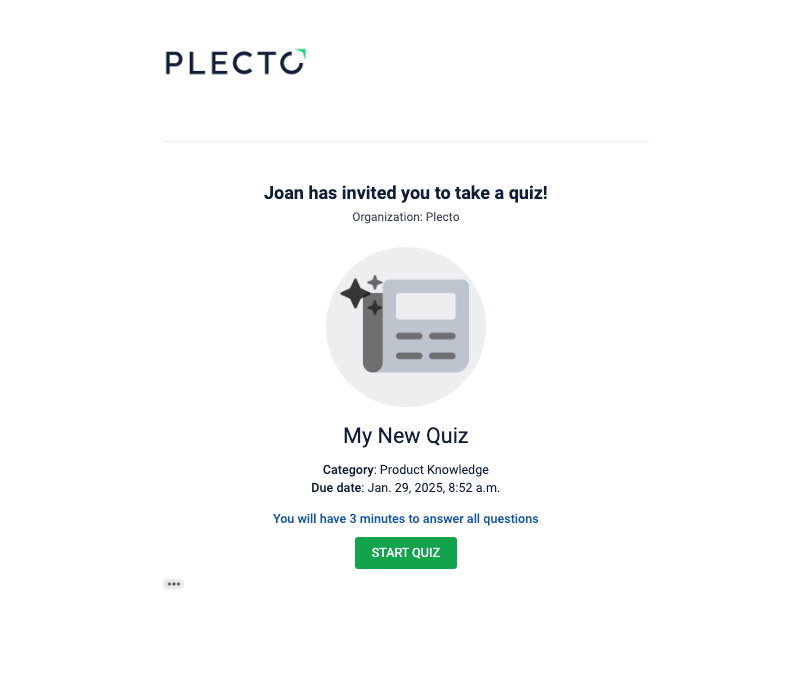
Check your email. You’ll receive an email invitation when the quiz session opens.
-
Open the email and click Start Quiz to access the quiz. It will immediately open the first question. If the quiz has a time limit, you will see in the email how much time you have to answer the questions.
-
You can also navigate to My Quizzes in Plecto to start your quiz.
-
-
Navigate through the quiz. The quiz may include different questions:
-
Multiple Choice Questions: Select one or more correct answers.
-
Sort-Into-Order Questions: Drag and drop answer cards into the correct sequence.
-
Match-The-Pair Questions: Match items by dragging answers to their correct counterparts.
-
Open-Ended Questions: Type your answers (short, long, or numerical).
-
Info Slides: These provide context or learning material—read or watch them carefully before proceeding to the next question.
-
-
Submit your answers and review the results. Depending on the quiz setup:
-
You may see your results immediately after submitting.
-
For quizzes with open-ended questions, your results will be available once the reviewer has scored them.
-
-
Follow up (Optional). If your quiz is part of training or onboarding, check with your manager or team leader for feedback or next steps based on your results.
💡 Good to know!
-
If your quiz has a time limit:
-
The quiz will close once the time runs out. You will fail any remaining unanswered questions.
-
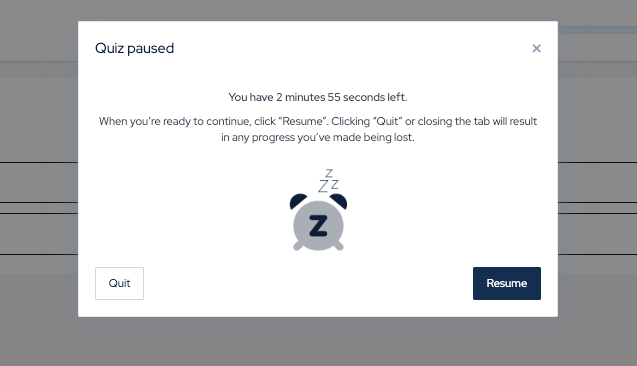
You can pause the quiz and finish it later - just keep the quiz tab open!
-
-
You can complete a quiz in the mobile app. If you have Plecto on your phone, you can complete a quiz there.