Sign in
How to Restrict Dashboard Access
Restrict dashboard access by team
You can limit dashboard visibility to specific teams in your organization. These restrictions apply to all users except organization admins.
-
Global Admins can view and edit all dashboards, regardless of restrictions.
-
Non-restricted dashboards are visible to all users with login access.
-
Only the teams listed in the access settings (and their sub-teams) can view a restricted dashboard.
Example: If a dashboard filters data by Team Red but access is restricted to Team Green, only Team Green members will be able to view it.
How to restrict dashboard access:
-
Open a dashboard.
-
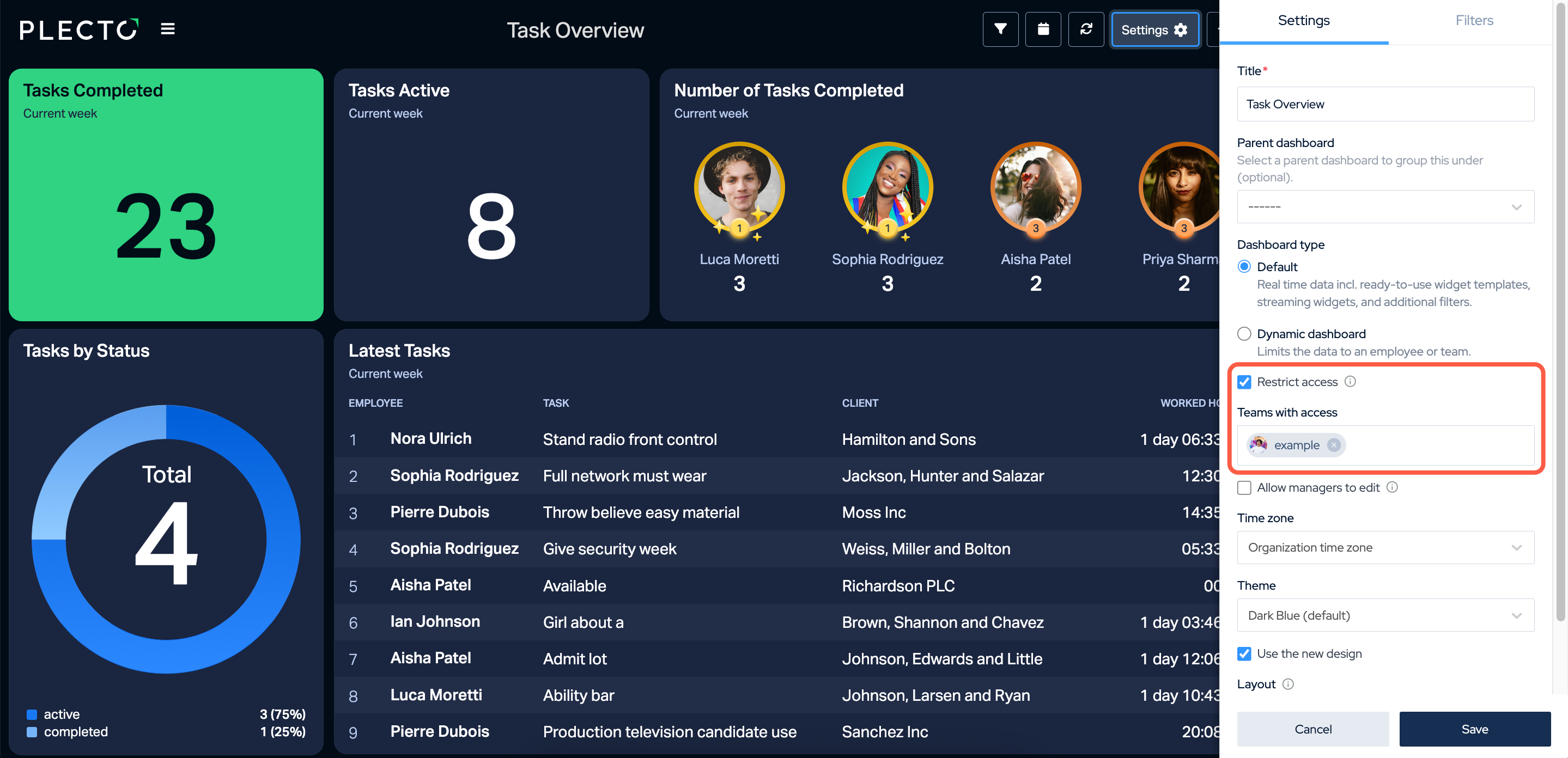
Click Settings in the top menu.
-
Enable Restrict access.
-
Add team(s) in the Teams with access field. Everyone from the added teams and their sub-teams will be able to access the dashboard.
-
Click Save in the bottom-right corner to finish.
Note:
-
If you restrict a parent dashboard, all its sub-dashboards inherit the restriction.
-
If a sub-dashboard has its own access settings, those will override the parent’s restrictions.